🎨
AI Seeds • Beginner⏱️ 15 min leestijd
Your First AI Model
Time to Get Hands-On! 🎉
You've learned what AI is and how machines learn. Now it's time to build one yourself.
Don't worry — you won't need to install anything or write any code. Everything happens right here in your browser.
What We'll Build
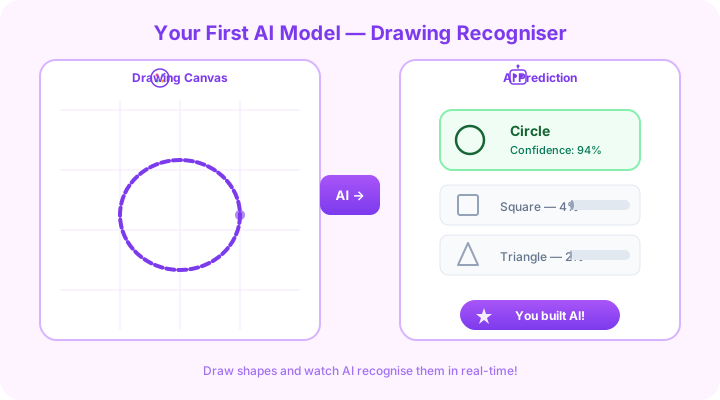
We're going to train an AI that recognises drawings. You'll:
- Draw examples of different shapes (circle, square, triangle)
- Label them ("this is a circle", "this is a square")
- Watch the AI learn from your examples
- Test it with new drawings to see if it learned correctly
This is real machine learning — the same concept used by Google, Apple, and every major tech company.
🧠Quick Check
What is the FIRST step when training an AI to recognise drawings?
Try It: Go to the Playground
Head over to our AI Playground to try the Drawing Recogniser!
Here's what to do:
- Click on the drawing canvas
- Draw a simple circle
- The AI will try to guess what you drew
- Try different shapes — squares, triangles, stars
- See how confident the AI is in its guess
✅
Start with simple, clear shapes. The AI works better with distinct drawings. A wobbly circle might confuse it at first!
What's Happening Behind the Scenes?
When you draw and the AI guesses, here's what's happening in simple terms:
-
Your drawing becomes numbers — The computer doesn't "see" your drawing. It converts it into a grid of numbers (bright pixels = high numbers, dark pixels = low numbers)
-
It compares to known patterns — The AI has been trained on thousands of similar drawings. It knows that circles tend to have certain patterns of numbers, squares have others
-
It calculates confidence — For each shape category, it calculates a percentage: "72% circle, 18% oval, 10% square"
-
It gives its best guess — The highest percentage wins!
This is the same basic process used in medical imaging — doctors' AI tools look at X-rays and compare them to millions of previous X-rays to detect problems.
Understanding the Results
When you see the AI's guess:
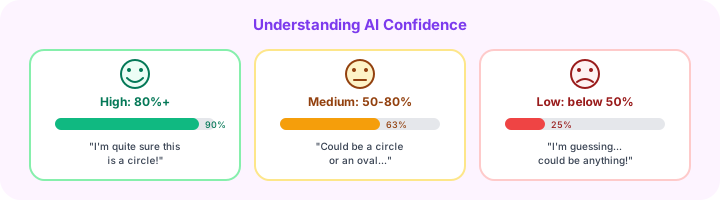
- High confidence (80%+) — The AI is quite sure. Your drawing closely matches patterns it has seen before.
- Medium confidence (50-80%) — The AI is somewhat sure, but the drawing could match multiple shapes.
- Low confidence (below 50%) — The AI is guessing. Your drawing doesn't clearly match any pattern it knows.
🧠Quick Check
You draw a shape and the AI says '92% circle.' What does that mean?
🤔
Think about it:
What happens when you draw something the AI has never seen — like a house or a cat? It will still try to classify it as one of its known shapes. This is a limitation: AI can only recognise what it's been trained on.
Experiment Ideas
Try these experiments to understand AI better:
Experiment 1: Draw the Same Shape Differently
Draw a circle 5 different ways — big, small, thick, thin, wobbly. Does the AI still recognise all of them?
Experiment 2: Try to Trick It
Draw something between a circle and a square (a rounded square). What does the AI say? This shows you how AI handles ambiguity.
Experiment 3: Draw Something Unknown
Draw a star or a heart. The AI wasn't trained on these — what happens? This demonstrates the limits of training data.
What You've Just Done
Congratulations! 🎉 You've just experienced the core concepts of AI:
- Training data — The examples the AI learned from
- Pattern recognition — How the AI identifies shapes
- Prediction — Making a guess based on learned patterns
- Confidence scores — How certain the AI is
- Limitations — AI can only recognise what it was trained on
These same concepts power everything from self-driving cars to medical diagnosis to voice assistants.
Quick Recap 🎯
- AI converts your drawing into numbers and compares it to known patterns
- Higher confidence = the drawing more closely matches known examples
- AI can only recognise what it's been trained on — it can't handle truly unknown things
- The same basic process powers real-world AI applications
🧠Quick Check
What happens when you draw a star for an AI that was only trained on circles, squares, and triangles?
What's Next? 🚀
Coming soon: AI in the Real World — where we'll explore how AI is used in healthcare, agriculture, education, and more. Plus, we'll discuss the important topic of AI ethics and bias.
Stay curious! 🌟
Lesson 3 of 30 of 3 completed